Philips the electronics giant commissioned Edward Ihnatowicz to create a sculpture for its new technology center Evoluon in Eindhoven. This commissioning came about as a result of a previous work he produced, a cybernetic sculpture called SAM. SAM is an acronym for Sound Activated Mobile.
SAM was a flower like object with 4 fibreglass petals on which 4 microphones where attached. This was mounted to a spine made of cast aluminum components. The microphones detected the direction sound was coming from and reacted to the sound through movement which was powered by hydraulic actuators.
This gave a truly unique experience from a device that looked in form to be recognizable as a flower responding to an individuals sound input. It seems strange that he chose this as a form factor given that flowers don’t normally react to sound! It may have been the requirements of focusing sound in the direction of the microphones meant that this particular form factor was needed and even then the movement could be unpredictable which adds to the charm of the object.
The Senster was a cybernetic sculpture on another scale, much larger and with more moving components than the SAM it took the form of an abstract lobster claw. It acted under sound input also and had more dexterous movements coming closer to an animal in how it behaved.
What I thought was fascinating about this piece was for me not just the physical device and interactions that came from from individuals experiencing it, but its connection to the commercial technology industry as a centre piece of a technology center for one of the biggest electronic companies in the world. Was it a sign of the future? That we will interact with pieces of art and be entertained by them? That companies would one day take the lessons learned from observing how these interactions occurred and then implement features that fit these interactions into products that we use every day?
Many companies today actively engage in creating experiences which involve developing new technologies as a result of understanding how people react to new experiences. These experiences come in the form of art or installations. Nokia Bell Labs in recent years have reinvigorated their program for E.A.T and make the connections between engineering and art as a result. Lego have installations at Lego House in Billund, Denmark which are designed to encourage children and adults alike to create objects from random Lego pieces and build stories around them. Recently Lego launched an app that allows you to scan your pieces and makes suggestions of what you can build from them. Could this new app have been developed as a result of thousands of hours of people playing and interacting with the installations at Lego house?
Today we are surrounded by technologies that react to our inputs in different ways, many of them we probably don’t even notice anymore and take for granted. The onward march of technology enables us to interact with objects in ways we never could before. It helps us to interact with new products we may not understand if it was not there as an enabler. It in many circumstances the technology could have been informed by interactions with interactive art.
To me there is a significant connection to be made. Senster commissioned as a piece of interactive art by Philips could have been one of the seminal moments in time that brought us on the course of developing our emotional relationships with technologies in the products we use in our homes today!
The assignment we got this week was to complete some labs based on our previous weeks class. This was to be a steep learning curve for me in all the things that could go wrong when prototyping some basic electronics. I had watched the vast majority of the videos prescribed to us before the course so I felt I had a reasonable grasp on things. I may have been wrong!
We had to use some of the components we purchased before the course to create a circuit which had 2 LEDs on it. The circuit would have a button on it that when it was not being pressed one LED would remain on, in this case the blue one and when the button was pressed the blue one would switch off and the red LED would come on. Seems simple right?
Wrong! The first major lesson I learned was my breadboard was not functioning. No matter what I tried nothing would work. I repeatedly switched cables around,changed resistors, used different LEDs all to no avail. I knew the actual Arduino was fine as it was showing up as connected to my computer. After much trouble shooting and frustration I realized it was the breadboard. A little panic and a few phone calls later a friend of mine who plays around with electronics a bit dropped by with some smaller but better quality bread boards. Problem fixed!
I wired everything up and connected the power from the computer, compiled the sketch and hit upload. I got an error telling me that the sketch could not upload! After some searching on the internet it turns out that the windows app for Arduino from the App Store is very buggy.
Uninstalled it and then downloaded the program from the official Arduino website. Installed it and the relevant updates required to get the Arduino connected. Finally I could get this to work. I didn’t work! Well not as intended. Time to check had I connected everything correctly. Again!
Example of taking out one component and how it affected the circuit.
This video has time lapse taken over a number of hours showing how I had to change to a new breadboard. I also had some issues around software updates for the Arduino itself. At the end I finally manage to get the circuit to work.
I did try the other speaker sketch but ran into issues immediately. Hope to get this under control by next class!
This week the assignment I had to do involved learning some fundamentals of coding and trying to change my original self portrait. It was going to be several days of frustration as I have zero coding experience!
For my original sketch I created a wheelchair and user motif, my challenge was to try and do the following.
One element controlled by the mouse.
One element that changes over time, independently of the mouse.
One element that is different every time you run the sketch.
Did I do this? Yes and no! I did manage to do get a sketch created with an element controlled by a mouse but it was not my portrait sketch. I did manage to create a sketch that one element changed or was different every time I ran the sketch. I didn’t mange to create a sketch with an element that changed over time, independently of the mouse. However I did manage o learn how to animate my original self portrait with what I learned from this weeks video tutorials!
I really struggled with learning about variables which meant many hours of repeatedly watching the videos until some of the information stuck, then I just repeated exactly what was going on in the tutorials to really try to grasp the lessons. It was a laborious process but I feel like I am starting to understand!
This is the code I created to declare elements of the sketch. In order to make the elements move I had to apply a speed declaration to each of the elements too! I am sure that this can be done much more quickly and much more easily! I got it to work however!
This video shows how the animation works. Where I ran into some problems was when I tried to apply the same speed variable to all of the elements. It didn’t work at all. What I had to do then was create an individual speed variable for each element and then had to further apply the speed variables to specific points on some of the elements. For example on the arm2 element I had to apply the speed9 variable at x1 and x2 to get it to move correctly! It took a while to do all of the elements once I figured this out.
This image shows how I applied the variables as part of the draw function. This was a steep learning curve!
In this sketch I tried some more experimentation with moving elements with the mouse while implementing object literals!
It’s been a challenge for me as a person with zero coding but I hope that I can grasp things a little quicker as a result of learning the fundamentals!
On the average day I will interact with many, many sensors in different objects. I am looking at devices and objects I use outside my phone or other technologies that have sensors and are immediately apparent. I have chosen to look at the other interactions I have with sensors or devices that have sensors on a daily basis.
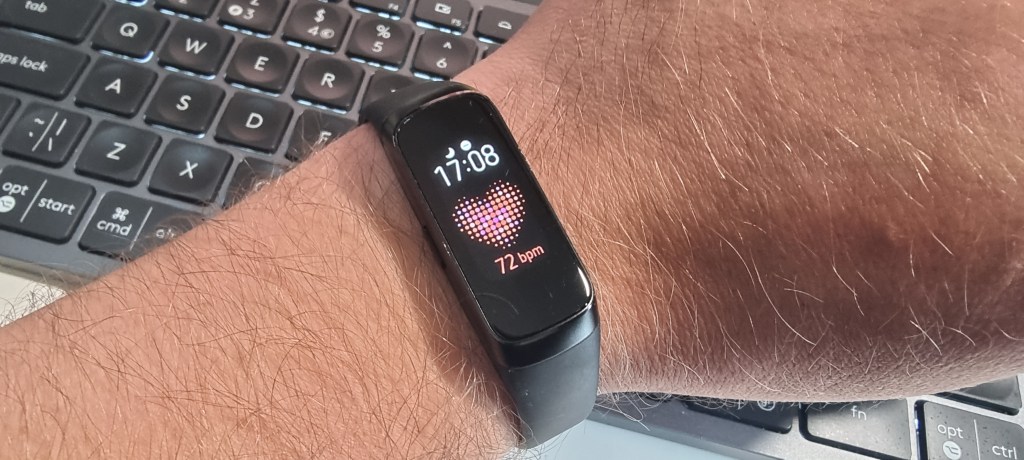
The first device I pick up and put on in the morning is my fitness band. I put it on and it is now tracking my movements and logging steps. Inside the device is an accelerometer a gyroscope and a sensor that can track heart rate too. I don’t wear it at night so it doesn’t track my sleep but I do wear it during the day and it gathers step count and heart rate data throughout the day. It uses a small touch screen to interact with onscreen menus too.
Throughout the day I will interact with the fitness band on several occasions.
A couple of times a day I will need to run errands and get into my car to do so.
Approaching the car there are 2 ways to gain entry. By pressing the button on the keyfob or when you are close to the car placing your hand on the door handle activates a sensor that knows the fob is in close proximity and unlocks the car.
Once I have opened the car I get in and transfer my wheelchair into the passenger seat. I have to be careful how I place the wheelchair as a sensor inside the seat detects if there is something on it and will set off a seat belt warning if the seat belt is not on. This is very annoying as it is impossible to get the seatbelt over the wheelchair. Positioning is key to ensuring the alarm does not sound.
Then I put on my own seat belt, adjust the seat and start the engine. If it has been raining or is raining as can be the case a lot of the time in Ireland the sensor in the wind screen will automatically activate the wipers clearing the windscreen. It will repeat this until the windscreen is clear.
Engaging reverse gear the screen in the center console shows a view of what’s behind the car via a camera sensor mounted in the rear boot/trunk door. There is also proximity sensors front and rear on the car that give feedback audibly when you approach obstacles.
Once I reverse out of my drive way I engage first gear. The gearbox is automatic and in a modern car I believe that this is electronically operated. The sensor detects the position of the gear stick and engages the transmission which inturn when the accelerator is pressed propels the vehicle forward under initially the electric motor and at higher speeds the petrol engine as the car is hybrid.
As I am driving there are dozens of sensors all working at the same time to ensure safe driving of the car. Proximity sensors detect vehicles behind as well as infront of the car, wipers work automatically if it rains and on entry and exit of dark areas such as tunnels or at night the headlamps automatically engage by way of sensors detecting light levels. Detecting the light level also changes the screen of the dashboard interface to darkmode or light mode based on the lighting conditions.
When I get to a motorway/highway I have the option to engage dynamic radar cruise control and lane assist. My car will accelerate and decelerate based on the speed of the car I front and keep a specific distance to the car in front based on my initial input. It will do this until it reaches a max speed threshold I have also put into the cruise control the radar for the cruise control is situated behind the badge on the front of the car.
Lane assist detects the lines and barriers on the roadside and steers the car within those lines. You must maintain a grip on the steering wheel but it does relieve some effort in steering. Taking your hand of the wheel the car will audibly alert you to grab the wheel. The sensor used for this is positioned just behind the rear view mirror at the top of the windscreen.
When I get to my destination I will park the car, again the proximity sensors in the front and rear of the car give feedback to let me know how close I am to an obstacle and return an audible tone that tells me. On reversing the rear camera kicks into action again with an overlay giving me the best path to obstacle avoidance as I reverse.
Once parked I then shut down the engine. I open the door and left my wheelchair out and assemble it. I then transfer from the car to my wheelchair. One habit I used to have was once parked I would open the door of the car and then shut down the engine when I had the parking brake engaged. Then I would transfer to my wheelchair. I noticed that the car would start to emit an alert when I did things in this sequence. I think it is to alert the driver to the fact that the door is open in case they leave the vehicle unattended. Once I figured this out I knew what sequence to do in order to prevent it. Locking the car is done by either pressing lock on the key fob or touching the sensor on the door handle. The car will also give an alert if the key is inside the car when you try to lock it or if the key is not present when you try to start it.
There are probably dozens more sensors all working with each other and creating outputs that manipulate my actions into the direction of intent for correct use of features and safe driving. The ones mentioned in this post are the ones that appear to be most obvious to me when driving the car.
One of the more awesome sets of sensors I have interacted with were those positioned inside an exoskeleton when I walked for the first time in 15 years. I am paralyzed from the chest down and have been since a mountain biking accident which ended my career in the military.
With the relevant adjustments made to the exoskeleton to suit my body I position myself beside the exoskeleton and then transfer myself across to the chair it is sitting on. Then with the help of the staff at DCU sports campus the straps are put in place around my legs, waist and chest.
Once this is done a walking aid is placed in front of me and one of the physiotherapists powers on the exoskeleton. There is an audible countdown and the physiotherapist warns me of the exoskeleton standing me up. The motors and actuators engage and then I am lifted to the standing position.
The next stage is to begin taking a step, in the foot plates of the exoskeleton are load sensors. When I lean to one side and slightly forward the load sensor detects the difference in pressure and then activates the motors and actuators in that leg of the exoskeleton to move my leg. So when I lean left and slightly forward the exoskeleton lifts my right leg in a stepping motion. Once I have began to do this in sequence the speed can increase. There is also accelerometers and gyroscopes keeping the position of the exoskeleton corrected and to manage speed for safety purposes.
The physiotherapists also have control of the speed of the motor and actuators reactions to maintain a walking pattern. It is a strange sensation to use the exoskeleton and was incredible to walk again albeit with an aid for the first time in 15 years.
Once the session is over I have to be positioned in-front of a chair and the exoskeleton then by way of the remote control proceeds to the sitting position. I am unstrapped and can return to my wheelchair.
There are so many sensors acting and reacting in real time to our inputs and changing the way we interact with the world through their outputs. As they are more and more ubiquitous we begin to expect certain behaviors from objects we interact with. They are empowering people to engage in new and meaningful ways and in a lot of instances giving back something we don’t get any more of, time!


 Designing, Educating, Exploring